
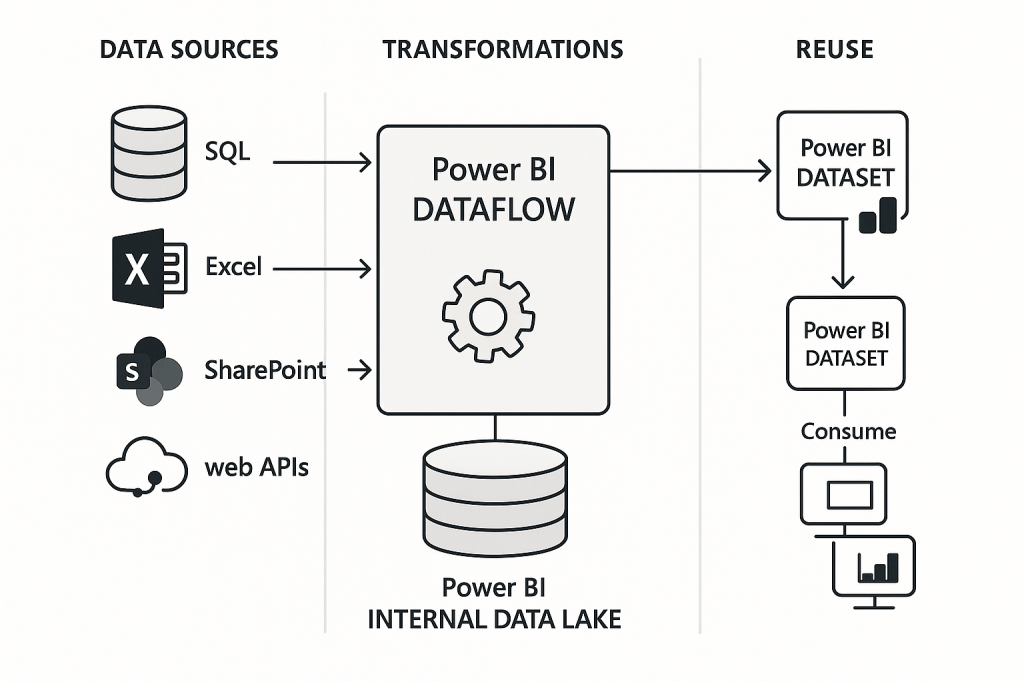
Power BI Dataflows are a self-service data preparation feature that allow you to define and manage ETL logic outside of Power BI datasets and reports. Designed for advanced users and data engineers, dataflows enable the centralization, reuse, and standardization of data preparation logic across an organization.
What Are Dataflows?
A dataflow in Power BI is a collection of tables created and managed in the Power BI Service. These tables are populated by Power Query Online, which allows data ingestion and transformation in the cloud. Dataflows can be consumed by Power BI datasets or other dataflows, enabling a flexible, modular data architecture.
✅ Dataflows support a wide range of data sources including SQL databases, Excel, SharePoint, web APIs, and more.
🧱 Dataflow Architecture
Here’s a simplified view of how data flows in Power BI:
1. Data Sources (Extract)
Data can be extracted from various sources such as:
- SQL Server, Oracle, Azure SQL
- Excel files
- SharePoint lists and libraries
- REST APIs and other cloud services
2. Transformations (Transform)
Using Power Query Online, you can:
- Clean and filter data
- Merge and append queries
- Apply business rules
- Create calculated columns and custom logic
These transformations are stored and managed in the Power BI Service.
3. Storage (Load)
Dataflows store their output into:
- Power BI’s internal storage
- Or optionally, Azure Data Lake Storage Gen2
This allows IT admins to manage and govern the data platform more effectively.
4. Reuse and Consumption
Dataflows can be:
- Reused across multiple Power BI datasets
- Referenced by linked entities
- Used as a foundation for reports and dashboards
This enables consistency and reusability in data models.
🔁 Features of Dataflows
| Feature | Description |
|---|---|
| Linked Entities | Reference other tables from existing dataflows |
| Computed Entities | Create new entities using other entities |
| Scheduled Refresh | Automate data updates at regular intervals |
| Incremental Refresh | Refresh only new or changed data |
| Data lineage view | Visualize relationships and dependencies |
🎯 When to Use Dataflows
- When multiple teams or reports require access to the same transformed data
- To offload heavy transformations from Power BI Desktop to the cloud
- To align data preparation with organizational data governance policies
⚙️ Related Concepts
- Datasets: Use data from dataflows or directly from sources for reporting
- Datamarts: Combine SQL database + dataset + visual model in one UI
- Power Query: Shared transformation engine across Power BI Desktop, dataflows, Excel, and more

Leave a comment